
Check LNB power at the ICM.
If an onboard electrician can do so, follow these steps:
- Power off the antenna system.
- Disconnect the RX cable from the ICM.
- Reapply power and wait for the error to reappear.
- Using a meter, measure the voltage between the center conductor socket (+) and the outer metal shell (-) of the RxRF connector on the back of the ICM. If you do not measure 13 VDC or 18 VDC, the ICM might be faulty – contact KVH Technical Support.
- Power off the antenna system.
- Reconnect the RX cable
Check the RX cable by swapping it with the TX cable.
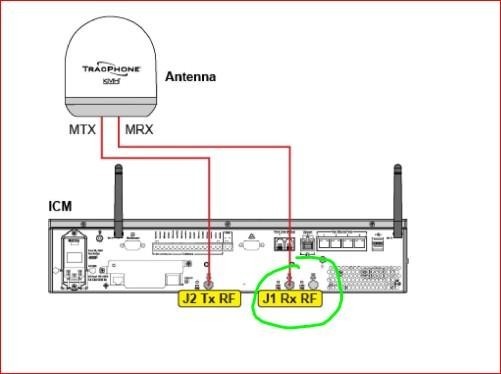
If the antenna cable connections are accessible, follow these steps:
- Power off the antenna system.
- Swap the TX and RX RF cable connections at the ICM:
Disconnect the TX and RX cables (with pigtails) from the ICM. Then connect the TX cable to the “RxRF” connector, and connect the RX cable to the “TxRF” connector.
- Swap the TX and RX RF cable connections at the antenna:
Detach the antenna from its mount to access the cable connections on the baseplate. Disconnect the TX and RX cables (with pigtails) from the antenna. Then connect the TX cable to the “MRx” connector, and connect the RX cable to the “MTx” connector.
- Resecure the antenna to its mount. Then reapply power to the system and wait a few minutes for initialization.
- If the same “NO LNB POWER” error occurs, the problem is not related to the RX cable.
If the antenna now tracks the satellite and the ICM reports a “BUC POWER OPEN” error, the RX cable, an inline pigtail cable, or one of the connectors is faulty. First check the pigtail cables by connecting the RX cable directly to the ICM and antenna. Then try replacing the connectors. If the error still occurs, inspect the RX cable throughout its run and replace the cable if necessary.


