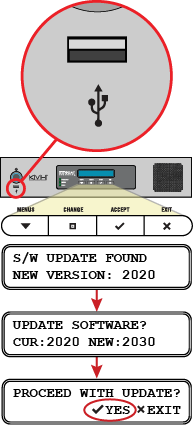
To update the software using a USB flash drive, follow these steps:
- First, you need to save the latest software update file to the root directory of your USB flash drive. KVH-certified technicians can download this file from the KVH Partner Portal.
Customers can get this file from KVH Technical Support (see Contacting KVH Technical Support). - Make sure the TracPhone system is turned on and initialized (the ICM front panel LCD shows “Searching” or “Tracking”).
- Connect your USB flash drive to the USB port on the front of the ICM.
- The ICM display shows the currently installed software version (“CUR”) and the software version found on the USB flash drive (“NEW”). Make sure the “NEW” version is a higher number than the “CUR” version.
- At “PROCEED WITH UPDATE?,” press ACCEPT.
Software Update Process on ICM Front Panel