
Overview #
The Iridium Extreme 9575 is a rugged, satellite phone designed for reliable communication in the most remote and challenging environments. It is part of the Iridium satellite network, which provides global coverage, including polar regions, oceans, and deserts. The Iridium Extreme 9575 is built to withstand harsh conditions and offers features such as GPS tracking, SOS emergency services, and voice and data capabilities.
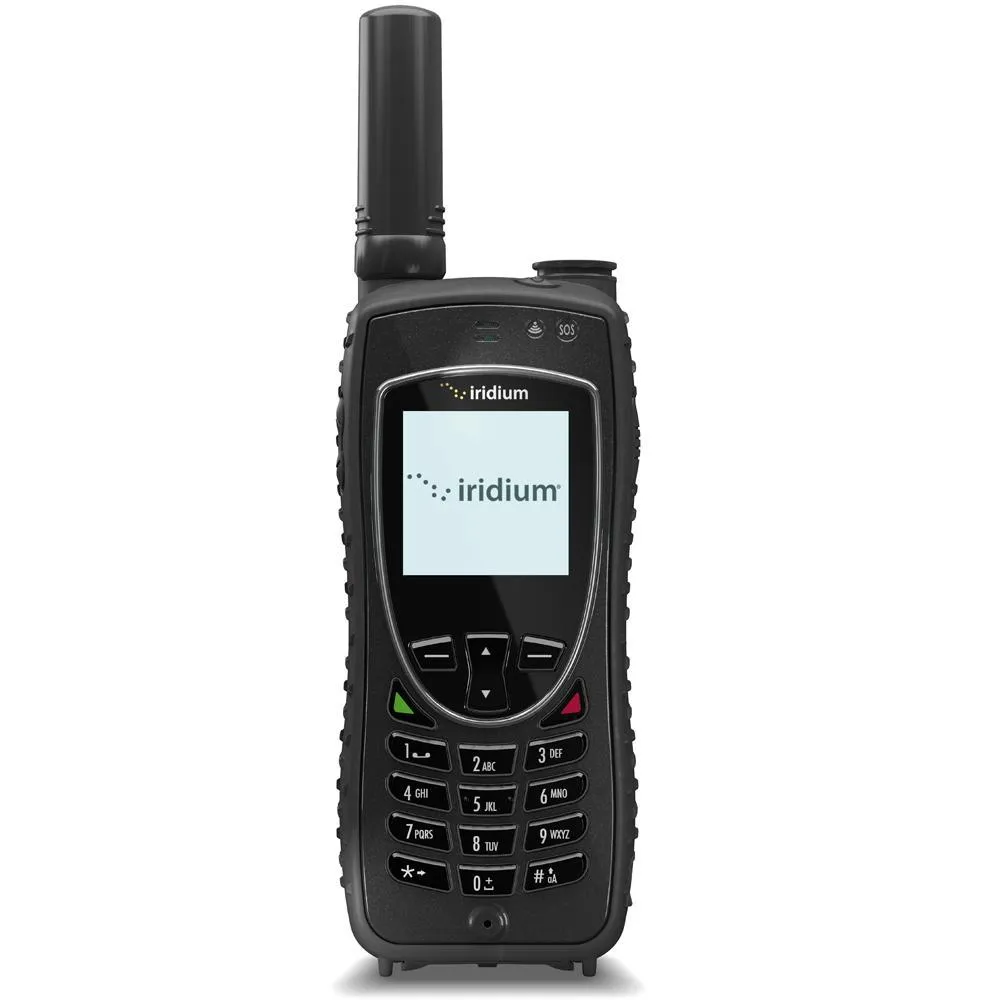
This documentation will cover the following aspects of the Iridium Extreme 9575:
- Key Features
- Technical Specifications
- Setup and Operation
- GPS and Tracking
- Emergency SOS Functionality
- Accessories
- Maintenance and Care
- Troubleshooting
- Frequently Asked Questions (FAQs)
1. Key Features #
- Global Coverage : Operates on the Iridium satellite network, providing coverage anywhere in the world, including poles, oceans, and remote areas.
- Rugged Design : MIL-STD-810F and IP65 certified for durability and resistance to extreme temperatures, dust, and water.
- Integrated GPS : Built-in GPS functionality for location tracking and navigation.
- SOS Emergency Button : Dedicated emergency button for sending distress signals with GPS coordinates.
- Voice and Data Services : Supports voice calls, SMS, and low-speed data services (2.4 kbps).
- Long Battery Life : Up to 30 hours of standby time and 3.5 hours of talk time.
- SMS and Email : Send and receive text messages and emails via satellite.
- Bluetooth Connectivity : Pair with Bluetooth devices for hands-free operation.
- Customizable Tracking : Set up periodic location updates and tracking intervals.
- Compact and Lightweight : Weighs only 247 grams (8.7 oz) and is easy to carry.
2. Technical Specifications #
| Specification | Details |
|---|---|
| Dimensions | 139.7 mm x 54.6 mm x 31.4 mm (5.5 x 2.15 x 1.24 in) |
| Weight | 247 g (8.7 oz) |
| Battery | Lithium-ion rechargeable battery |
| Standby Time | Up to 30 hours |
| Talk Time | Up to 3.5 hours |
| Data Speed | 2.4 kbps |
| Operating Temperature | -20°C to +55°C (-4°F to 131°F) |
| Storage Temperature | -30°C to +70°C (-22°F to 158°F) |
| Water Resistance | IP65-rated (dust-tight and protected against water jets) |
| Drop Resistance | MIL-STD-810F compliant |
| Frequency Bands | L-band (1616 MHz to 1626.5 MHz) |
| Connectivity | Bluetooth 2.0 + EDR |
3. Setup and Operation #
Initial Setup #
- Charging the Battery : Before using the phone for the first time, charge the battery fully using the provided charger.
- Inserting the SIM Card : Open the SIM card slot located on the side of the phone and insert the Iridium SIM card.
- Power On : Press and hold the power button until the phone powers on. Wait for the device to connect to the Iridium satellite network.
- Antenna Deployment : Extend the antenna fully before making a call or sending a message. Point the antenna toward the sky for optimal signal reception.
Making a Call #
- Enter the recipient’s phone number, including the country code.
- Press the green call button to initiate the call.
- Ensure the antenna is fully extended and pointed upward for the best connection.
Sending an SMS #
- Go to the “Messages” menu and select “New Message.”
- Enter the recipient’s phone number and compose your message.
- Press “Send” to transmit the message via satellite.
4. GPS and Tracking #
The Iridium Extreme 9575 comes with integrated GPS functionality, allowing users to track their location and share it with others.
Using GPS #
- Go to the “GPS” menu.
- Select “Get Position” to retrieve your current GPS coordinates.
- Share your location via SMS or email by selecting the appropriate option.
Tracking #
- Enable tracking in the settings menu.
- Set the tracking interval (e.g., every 5 minutes, 10 minutes, etc.).
- The phone will automatically send periodic location updates to a designated recipient or server.
5. Emergency SOS Functionality #
The Iridium Extreme 9575 features a dedicated SOS button for emergency situations.
Activating SOS #
- Press and hold the red SOS button for 3 seconds.
- The phone will send an emergency alert with your GPS coordinates to a pre-configured emergency contact or monitoring service.
- Continue holding the button until the LED indicator flashes red, indicating the SOS signal has been sent.
Configuring SOS Settings #
- Go to the “SOS” menu.
- Enter the emergency contact information or monitoring service details.
- Save the settings to ensure the SOS function works correctly.
6. Accessories #
- Carrying Case : Protects the phone from impacts and environmental hazards.
- External Antenna : Enhances signal reception in areas with poor coverage.
- Vehicle Mount : Allows hands-free operation while driving.
- Solar Charger : Provides an alternative power source in remote locations.
- Docking Station : Enables desktop use and charging.
7. Maintenance and Care #
- Cleaning : Use a soft, dry cloth to clean the exterior. Avoid using abrasive materials or chemicals.
- Battery Care : Charge the battery regularly and avoid overcharging. Replace the battery if it no longer holds a charge.
- Storage : Store the phone in a cool, dry place when not in use.
- Antenna Care : Ensure the antenna is free of dirt and debris. Do not bend or damage the antenna.
8. Troubleshooting #
| Issue | Solution |
|---|---|
| No Signal | Ensure the antenna is fully extended and pointed toward the sky. |
| Battery Not Charging | Check the charging cable and adapter. Try a different power source. |
| Unable to Make Calls | Verify that the SIM card is inserted correctly and has sufficient credit. |
| SOS Function Not Working | Check the SOS settings and ensure the emergency contact information is accurate. |
| Low Volume | Adjust the volume settings or check for obstructions in the speaker. |
9. Frequently Asked Questions (FAQs) #
Q1: Does the Iridium Extreme 9575 work everywhere? #
A1: Yes, the Iridium Extreme 9575 provides global coverage, including polar regions, oceans, and remote areas.
Q2: Can I use the phone indoors? #
A2: The phone requires a clear line of sight to the sky for optimal performance. Indoors, you may experience weak or no signal unless using an external antenna.
Q3: How long does the battery last? #
A3: The battery provides up to 30 hours of standby time and 3.5 hours of talk time.
Q4: Is the phone waterproof? #
A4: The phone is IP65-rated, meaning it is dust-tight and protected against water jets but not fully waterproof.
Q5: Can I send emails with the Iridium Extreme 9575? #
A5: Yes, you can send and receive emails via satellite, but the data speed is limited to 2.4 kbps.


