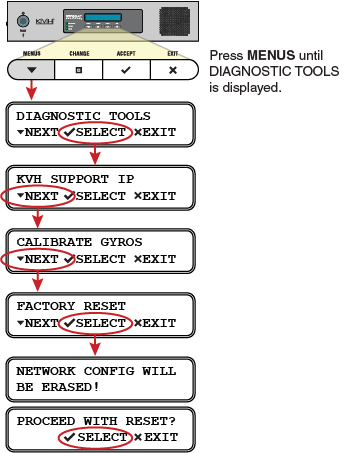
If the system’s network becomes corrupted such that you can no longer access the TracPhone V7-HTS web interface, and KVH Technical Support is unable to access the system remotely, you can reset the system to its original factory settings.
The following settings are included in the reset:
- Reverts to Standard HTS network configuration
- Deletes any custom CommBox configurations
- Clears any configured no-transmit zones
- Sets the ICM’s LCD brightness to High
To reset the system to its factory settings, follow these steps:
- At the ICM’s front panel, press MENUS until the display shows “DIAGNOSTIC TOOLS.”
- Press ACCEPT.
- At “KVH SUPPORT IP,” press NEXT.
- At “CALIBRATE GYROS,” press NEXT.
- At “FACTORY RESET,” press ACCEPT.
- At “PROCEED WITH RESET?,” press ACCEPT.
The system reverts to its original factory settings. Do not power off the system while this reset is in progress.
Factory Reset